> ## Documentation Index
> Fetch the complete documentation index at: https://docs-staging-feat-init-gt-translations.mintlify.site/llms.txt
> Use this file to discover all available pages before exploring further.
> 電話プロバイダーの設定をUnified Phone Experienceに移行します。
# 多要素認証でAuth0のUnified Phone Experienceを使用する
Unified Phone Experienceに移行するには、次のいずれかを満たしている必要があります。
* テナントで多要素認証 (MFA) のSMS、音声、またはSMS+音声通知が有効化され、設定済みであること、または
* テナントでパスワードレスSMSが有効化され、設定済みであること
MFAまたはパスワードレスのどちらも設定していない場合は、最初から始めるには[Configure Auth0's Unified Phone Experience](/docs/ja-jp/customize/phone-messages/unified-phone/configure-unified-phone)を参照してください。
MFAとパスワードレスの両方で異なるプロバイダーと連携している場合は、[Custom Phone Provider](/docs/ja-jp/customize/phone-messages/configure-phone-messaging-providers/configure-a-custom-phone-provider)を使用する必要があります。
Phone as IDを利用している場合は、Auth0のUnified Phone Experienceが自動的に使用されるため、追加の対応は必要ありません。
Unified Phone Experienceでは、電話プロバイダーの設定をテナント内の1か所に集約できます。複数の電話認証要素ごとに、電話プロバイダーを何度も設定する必要はありません。MFAの電話認証要素について詳しくは、[SMS and voice notifications for MFA](/docs/ja-jp/secure/multi-factor-authentication/multi-factor-authentication-factors/configure-sms-voice-notifications-mfa)を参照してください。
すでに[SMS and Voice notifications for Multi-Factor Authentication (MFA)](/docs/ja-jp/secure/multi-factor-authentication/multi-factor-authentication-factors/configure-sms-voice-notifications-mfa)用の電話プロバイダーを設定している場合は、その設定をUnified Phone Experienceに移行し、テナントレベルのプロバイダーとして適用できます。
テナントレベルのプロバイダーでは、電話メッセージが正常に送信されたかどうかについて、Auth0からエンドユーザーへのフィードバックは提供されません。問題をトラブルシューティングするには、[テナントログ](/docs/ja-jp/deploy-monitor/logs)を確認してください。
電話プロバイダーを更新する
Unified Phone Experience を使用するには、次の対応が必要です。
* 現在の設定を確認する
* プロバイダーを設定する:
* Twilio を設定する
* カスタム電話プロバイダーを設定する
* 電話認証要素と配信方法を更新する
* Management API エンドポイントを更新する
* Auth0 Actions のトリガーを更新する
現在の設定を確認する
1. 現在の MFA 設定を確認するには、[**Auth0 Dashboard > Security > Multi-factor Auth**](https://manage.auth0.com/#/security/mfa) に移動します。
2. **Phone Message** を選択します。
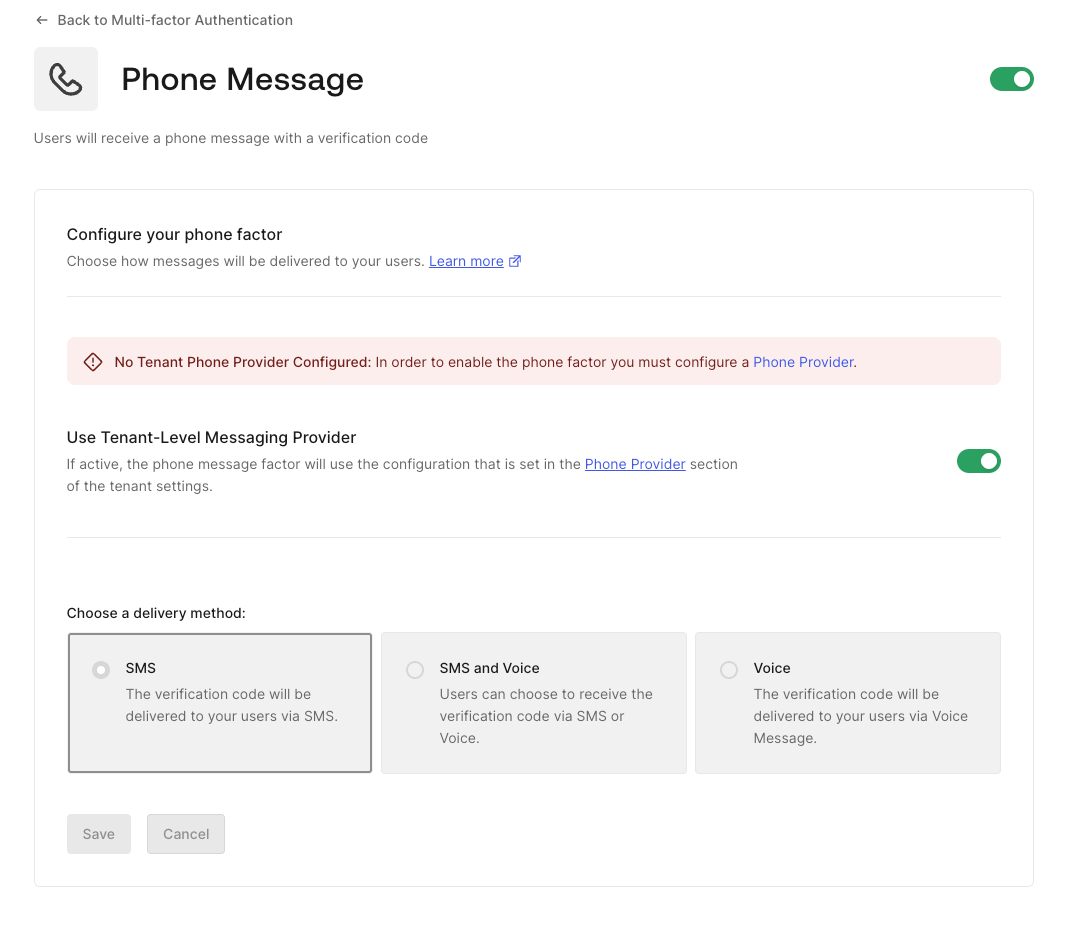
3. 新しい Auth0 テナントでは Unified Phone Experience を利用でき、テナントの電話プロバイダーを設定するよう促すバナーが表示されます。
 * 2025 年 3 月より前からある既存のテナントでは、Unified Phone Experience に加えて、多要素認証 (MFA) 用の SMS and Voice 通知も設定できます。
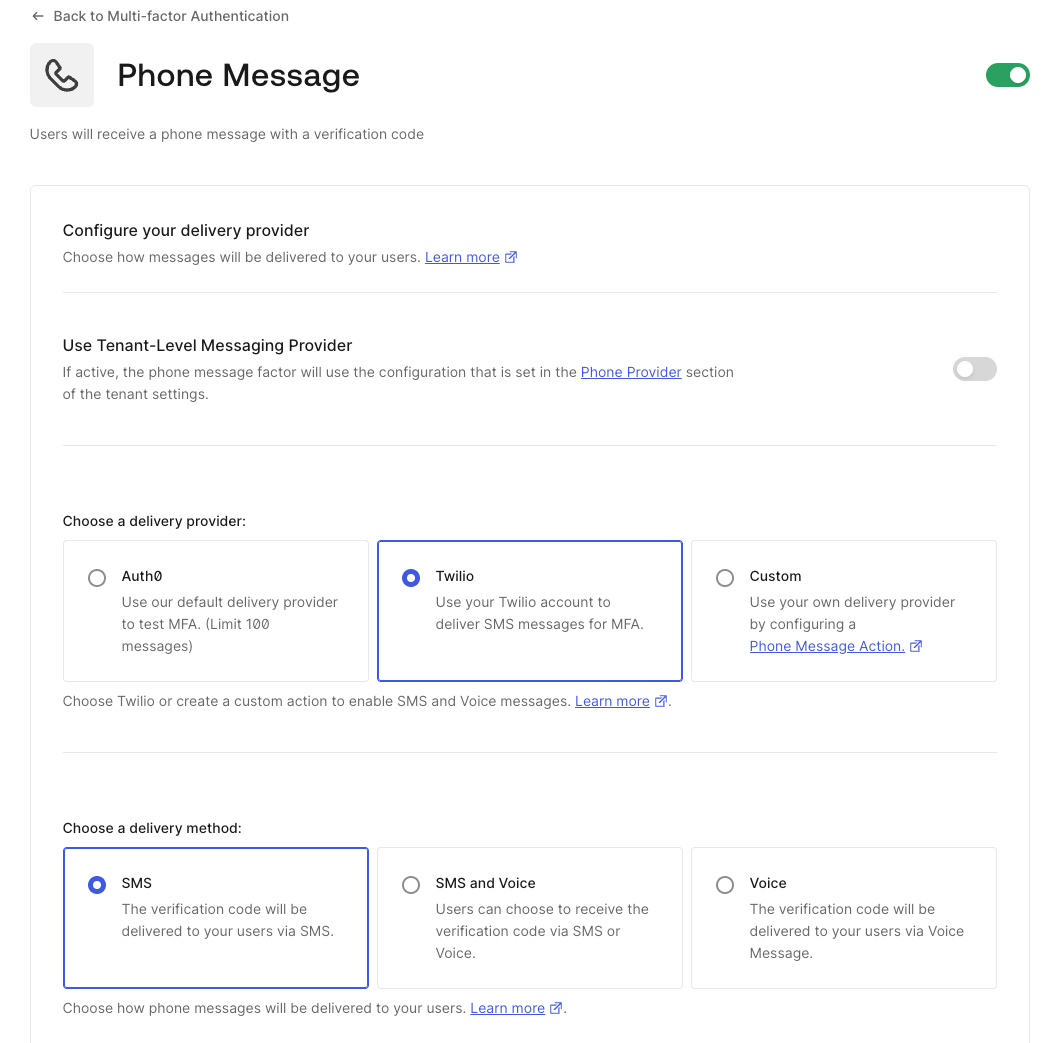 Auth0 では Unified Phone Experience の使用を推奨しています。電話プロバイダーの設定に [多要素認証 (MFA) の SMS and Voice 通知](/docs/ja-jp/secure/multi-factor-authentication/multi-factor-authentication-factors/configure-sms-voice-notifications-mfa) を使用する必要があり、**Use Tenant-Level Messaging Provider** の切り替えが表示されない場合は、[Auth0 Support](/docs/ja-jp/troubleshoot/customer-support) にお問い合わせください。
4. テナント設定を確認するには、[**Auth0 Dashboard > Tenant Settings**](https://manage.auth0.com/#/tenant/advanced) に移動します。
5. **Advanced** を選択します。
6. **Unified Phone Experience** を探します。
Auth0 では Unified Phone Experience の使用を推奨しています。電話プロバイダーの設定に [多要素認証 (MFA) の SMS and Voice 通知](/docs/ja-jp/secure/multi-factor-authentication/multi-factor-authentication-factors/configure-sms-voice-notifications-mfa) を使用する必要があり、**Use Tenant-Level Messaging Provider** の切り替えが表示されない場合は、[Auth0 Support](/docs/ja-jp/troubleshoot/customer-support) にお問い合わせください。
4. テナント設定を確認するには、[**Auth0 Dashboard > Tenant Settings**](https://manage.auth0.com/#/tenant/advanced) に移動します。
5. **Advanced** を選択します。
6. **Unified Phone Experience** を探します。
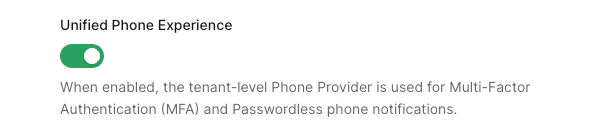 7. 必要に応じて有効にします。
多要素認証の電話プロバイダーとして Twilio を使用している場合は、Twilio SID と AuthToken を Unified Phone Experience に追加する必要があります。Twilio SID は既存の設定からコピーできますが、AuthToken の値は Twilio から取得する必要があります。
1. [**Branding > Phone Provider**](https://manage.auth0.com/#/phone/templates/phone/provider) に移動します。
2. プロバイダーを選択して設定します。
7. 必要に応じて有効にします。
多要素認証の電話プロバイダーとして Twilio を使用している場合は、Twilio SID と AuthToken を Unified Phone Experience に追加する必要があります。Twilio SID は既存の設定からコピーできますが、AuthToken の値は Twilio から取得する必要があります。
1. [**Branding > Phone Provider**](https://manage.auth0.com/#/phone/templates/phone/provider) に移動します。
2. プロバイダーを選択して設定します。
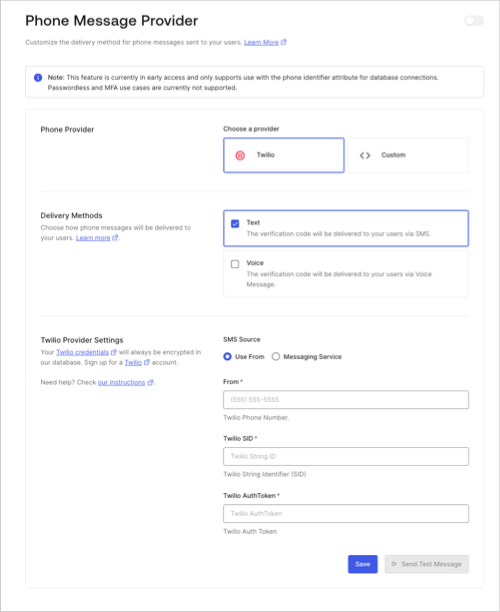 1. 電話プロバイダーとして Twilio を選択します。
2. 配信方法を選択します。
3. Twilio の設定を入力します。
必要な MFA 認証要素は、テナントレベルで設定する配信方法のサブセットである必要があります。
3. 変更を**保存**します。
4. **Send Test Message** を選択して、本番環境で使用する前にテナントレベルのプロバイダーをテストします。
5. テナントレベルのプロバイダーを有効にします。
1. MFA の場合は、[**Security > Multi-factor Auth > Phone Message**.](https://manage.auth0.com/#/security/mfa) に移動します。
2. **Use Tenant-level Messaging Provider** を選択します。
テナントにこのトグルが表示されない場合は、すでに Unified Phone Experience を使用しています。
6. 変更を**保存**します。
Unified Phone Experience では、カスタムの電話通知に `send-phone-message` トリガー を使用する代わりに、電話通知には `custom-phone-provider` トリガー を使用します。
以下の理由から、`send-phone-message` トリガー を `custom-phone-provider` トリガー に直接移行することはできません。
* メッセージタイプと通知タイプの間に 1:1 の対応関係はありません。
* `send-phone-message` トリガー に関連付けられた secrets や dependencies を移行すると、セキュリティ上の懸念が生じたり、テナントでの動作に影響が出たりする可能性があります。
* Actions は複数のトリガーをサポートできるため、移行が難しい場合があります。たとえば、Actions は `send-phone-message` トリガーと `post-login` トリガーの両方をサポートできます。
* `send-phone-message` トリガー と `custom-phone-provider` トリガー では、サポートされるイベントタイプが異なります。
* `send-phone-message` は SMS and Voice のメッセージタイプをサポートします。詳しくは、[Action triggers: send-phone-message Event Object](/docs/ja-jp/customize/actions/explore-triggers/mfa-notifications-trigger/send-phone-message-event-object) を参照してください。
* `custom-phone-provider` は、`otp_verify`、`otp_enroll`、`blocked_account`、`change_password`、`password_breach` の通知タイプをサポートします。詳しくは、[Actions triggers: custom-phone-provider Event Object](/docs/ja-jp/customize/phone-messages/configure-phone-messaging-providers/configure-a-custom-phone-provider/actions-triggers-custom-phone-provider-event-object) を参照してください。
* カスタム phone provider ごとに設定できる Action は 1 つだけです。すでにカスタム phone provider に Action を設定している場合は、新しい Action に関連付ける前に、**必ず**無効にする必要があります。
そのため、新しいコンテキスト変数を使用して、既存の `send-phone-message` を新しい `custom-phone-provider` に置き換える必要があります。
| `send-phone-message` context object | `custom-phone-provider` context object | 状態 |
| ----------------------------------- | ------------------------------------------------------------------------------------------------------------------------------------ | ---- |
| `text` | `notification.as_text` and `notification.as_voice` | 更新済み |
| `message_type` | `notification.message_type`
1. 電話プロバイダーとして Twilio を選択します。
2. 配信方法を選択します。
3. Twilio の設定を入力します。
必要な MFA 認証要素は、テナントレベルで設定する配信方法のサブセットである必要があります。
3. 変更を**保存**します。
4. **Send Test Message** を選択して、本番環境で使用する前にテナントレベルのプロバイダーをテストします。
5. テナントレベルのプロバイダーを有効にします。
1. MFA の場合は、[**Security > Multi-factor Auth > Phone Message**.](https://manage.auth0.com/#/security/mfa) に移動します。
2. **Use Tenant-level Messaging Provider** を選択します。
テナントにこのトグルが表示されない場合は、すでに Unified Phone Experience を使用しています。
6. 変更を**保存**します。
Unified Phone Experience では、カスタムの電話通知に `send-phone-message` トリガー を使用する代わりに、電話通知には `custom-phone-provider` トリガー を使用します。
以下の理由から、`send-phone-message` トリガー を `custom-phone-provider` トリガー に直接移行することはできません。
* メッセージタイプと通知タイプの間に 1:1 の対応関係はありません。
* `send-phone-message` トリガー に関連付けられた secrets や dependencies を移行すると、セキュリティ上の懸念が生じたり、テナントでの動作に影響が出たりする可能性があります。
* Actions は複数のトリガーをサポートできるため、移行が難しい場合があります。たとえば、Actions は `send-phone-message` トリガーと `post-login` トリガーの両方をサポートできます。
* `send-phone-message` トリガー と `custom-phone-provider` トリガー では、サポートされるイベントタイプが異なります。
* `send-phone-message` は SMS and Voice のメッセージタイプをサポートします。詳しくは、[Action triggers: send-phone-message Event Object](/docs/ja-jp/customize/actions/explore-triggers/mfa-notifications-trigger/send-phone-message-event-object) を参照してください。
* `custom-phone-provider` は、`otp_verify`、`otp_enroll`、`blocked_account`、`change_password`、`password_breach` の通知タイプをサポートします。詳しくは、[Actions triggers: custom-phone-provider Event Object](/docs/ja-jp/customize/phone-messages/configure-phone-messaging-providers/configure-a-custom-phone-provider/actions-triggers-custom-phone-provider-event-object) を参照してください。
* カスタム phone provider ごとに設定できる Action は 1 つだけです。すでにカスタム phone provider に Action を設定している場合は、新しい Action に関連付ける前に、**必ず**無効にする必要があります。
そのため、新しいコンテキスト変数を使用して、既存の `send-phone-message` を新しい `custom-phone-provider` に置き換える必要があります。
| `send-phone-message` context object | `custom-phone-provider` context object | 状態 |
| ----------------------------------- | ------------------------------------------------------------------------------------------------------------------------------------ | ---- |
| `text` | `notification.as_text` and `notification.as_voice` | 更新済み |
| `message_type` | `notification.message_type` - 値が異なる点に注意してください: `second-factor-authentication` と `otp_enroll`、`verify` と `otp_verify`
| 更新済み |
| `action` | `notification.delivery_method` | 更新済み |
| `language` | `notification.locale` | 更新済み |
| `code` | `notification.code` | 更新済み |
| `recipient` | `notification.recipient` | 更新済み |
| `send-phone-message` context object | テナントレベルのプロバイダー context object | 状態 |
| ----------------------------------- | ----------------------------- | ---- |
| `ip` | `ip` | 変更なし |
| `user_agent` | `user_agent` | 変更なし |
| `language` | `language` | 更新済み |
| `method` | `method` (任意) | 更新済み |
| `hostname` | `hostname` (任意) | 更新済み |
| `geoip` | `geoip` | 更新済み |
| `send-phone-message` context object | テナントレベルのプロバイダー context object | 状態 |
| ----------------------------------- | ----------------------------- | ---- |
| `tenant.id` | `tenant` | 更新済み |
| N/A | `tenant.home_url` | 新規 |
| N/A | `tenant.logo_url` | 新規 |
| N/A | `tenant.support_email` | 新規 |
| N/A | `tenant.support_url` | 新規 |
| `send-phone-message` context object | テナントレベルのプロバイダー context object | 状態 |
| ----------------------------------- | ----------------------------- | ---- |
| `client.client_metadata` | `client.metadata` | 更新済み |
| `client.client_id` | `client.client_id` | 変更なし |
| `client.name` | `client.name` | 変更なし |
| `send-phone-message` context object | テナントレベルのプロバイダー context object | 状態 |
| ----------------------------------- | ----------------------------- | ---- |
| `user.user_id` | `user.user_id` | 変更なし |
| `user.name` | `user.name` | 変更なし |
| `user.email` | `user.email` | 変更なし |
| `user.app_metadata` | `user.app_metadata` | 変更なし |
| `user.user_metadata` | `user.user_metadata` | 変更なし |
| `user.email_verified` | `user.email_verified` | 変更なし |
| `user.phone_number` | `user.phone_number` | 変更なし |
| `user.phone_verified` | `user.phone_verified` | 変更なし |
| `user.picture` | `user.picture` | 変更なし |
| `user.created_at` | `user.created_at` | 変更なし |
| `user.updated_at` | `user.updated_at` | 変更なし |
| `user.multifactor` | `user.multifactor` | 変更なし |
| `user.identities` | N/A | 削除済み |
| `user.family_name` | `user.family_name` | 変更なし |
| `user.given_name` | `user.given_name` | 変更なし |
| `user.nickname` | `user.nickname` | 変更なし |
| `user.username` | `user.username` | 変更なし |
| N/A | `user.login_count` | 新規 |
コンテキスト変数の完全な一覧については、[電話テンプレートをカスタマイズする](/docs/ja-jp/customize/phone-messages/phone-templates/customize)を参照してください。
カスタム電話プロバイダーの例を確認してください:
```javascript lines expandable theme={null}
const { fetch } = require('undici');
/**
* 電話通知の送信中に実行されるハンドラー
* @param {Event} event - ユーザーおよびログイン時のコンテキストに関する詳細情報。
* @param {CustomPhoneProviderAPI} api - 電話通知の送信動作を変更するためのメソッドとユーティリティ。
*/
exports.onExecuteCustomPhoneProvider = async (event, api) => {
if (event.notification.message_type.startsWith('otp')) {
const body = {
from: event.notification.from,
action: event.notification.message_type === 'otp_verify' ? 'second-factor-authenticator' : 'enrollment',
language: event.notification.locale,
recipient: event.notification.recipient,
message_type: event.notification.delivery_method,
text: event.notification.as_text,
code: event.notification.code,
};
const response = await fetch(event.secrets['MY_ENDPOINT'], {
method: 'POST',
headers: {
authorization: `Bearer ${event.secrets['MY_SECRET']}`,
},
body: JSON.stringify(body),
});
console.log(response.status); // 200
console.log(await response.text()); // リクエストのレスポンスボディ!
}
return;
};
```
MFA `custom-phone-provider` トリガーを設定するには、次の手順に従います。
1. [**Branding > Phone Provider**](https://manage.auth0.com/#/phone/templates/phone/provider) に移動します。
2. プロバイダーを選択します。
1. **Custom** を選択します。
2. **Provider Configuration** で、埋め込みコードエディターに翻訳した `send-phone-message` Action コードを追加します。
3. 変更を **Save** します。
4. 本番環境で使用する前に、**Send Test Message** を選択してテナントレベルのプロバイダーをテストします。
5. [**Security > Multi-factor Auth > Phone Message**](https://manage.auth0.com/#/security/mfa) に戻り、**Use Tenant-level Messaging Provider** を有効にします。
6. 変更を **Save** します。
MFA の 電話認証要素 と 配信方法 を更新する
Auth0 Dashboard でテナントレベルのプロバイダーを有効にしていない場合、MFA 用の電話認証要素である SMS と音声を設定することはできません。
 Unified Phone Experience への移行中に、現在の通知用 MFA 認証要素を別の種類に変更したい場合は、設定の変更が必要になることがあります。
| 現在の MFA 電話認証要素 | 目的の MFA 認証要素 | テナントレベルの配信方法 | ユーザーの対応 |
| -------------- | ------------ | ------------ | ------------------------------------------------------- |
| SMS | 音声 | SMS | ユーザーは、目的の MFA 電話認証要素を利用できるようにテナントレベルのプロバイダーを更新する必要があります |
| SMS | 音声 | SMS + 音声 | なし |
| SMS | SMS + 音声 | SMS | ユーザーは、目的の MFA 電話認証要素を利用できるようにテナントレベルのプロバイダーを更新する必要があります |
| SMS | SMS + 音声 | SMS + 音声 | なし |
| 音声 | SMS | SMS + 音声 | ユーザーは、目的の MFA 電話認証要素を利用できるようにテナントレベルのプロバイダーを更新する必要があります |
| 音声 | SMS | SMS + 音声 | なし |
| 音声 | SMS + 音声 | 音声 | ユーザーは、目的の MFA 電話認証要素を利用できるようにテナントレベルのプロバイダーを更新する必要があります |
| 音声 | SMS + 音声 | SMS + 音声 | なし |
| SMS + 音声 | SMS | SMS + 音声 | なし |
| SMS + 音声 | 音声 | SMS + 音声 | なし |
Unified Phone Experience への移行中に、現在のテナントレベルの電話プロバイダーの配信方法を別の種類に変更したい場合は、設定の変更が必要になることがあります。
| MFA 電話認証要素 | 現在のテナントレベルの配信方法 | 目的のテナントレベルの配信方法 | ユーザーの対応 |
| ---------- | --------------- | --------------- | ------------------------------------------------------------------ |
| SMS | SMS | SMS + 音声 | なし |
| SMS | SMS | 音声 | ユーザーは、MFA 電話認証要素がテナントレベルのプロバイダーで有効になっている配信方法のサブセットになるよう更新する必要があります |
| SMS | SMS + 音声 | 音声 | ユーザーは、MFA 電話認証要素がテナントレベルのプロバイダーで有効になっている配信方法のサブセットになるよう更新する必要があります |
| SMS | SMS + 音声 | SMS | なし |
| 音声 | 音声 | SMS | ユーザーは、MFA 電話認証要素がテナントレベルのプロバイダーで有効になっている配信方法のサブセットになるよう更新する必要があります |
| 音声 | 音声 | SMS + 音声 | なし |
| 音声 | SMS + 音声 | SMS | ユーザーは、MFA 電話認証要素がテナントレベルのプロバイダーで有効になっている配信方法のサブセットになるよう更新する必要があります |
| 音声 | SMS + 音声 | 音声 | なし |
| SMS + 音声 | SMS + 音声 | SMS | なし |
| SMS + 音声 | SMS + 音声 | 音声 | なし |
Unified Phone Experience への移行中に、現在の通知用 MFA 認証要素を別の種類に変更したい場合は、設定の変更が必要になることがあります。
| 現在の MFA 電話認証要素 | 目的の MFA 認証要素 | テナントレベルの配信方法 | ユーザーの対応 |
| -------------- | ------------ | ------------ | ------------------------------------------------------- |
| SMS | 音声 | SMS | ユーザーは、目的の MFA 電話認証要素を利用できるようにテナントレベルのプロバイダーを更新する必要があります |
| SMS | 音声 | SMS + 音声 | なし |
| SMS | SMS + 音声 | SMS | ユーザーは、目的の MFA 電話認証要素を利用できるようにテナントレベルのプロバイダーを更新する必要があります |
| SMS | SMS + 音声 | SMS + 音声 | なし |
| 音声 | SMS | SMS + 音声 | ユーザーは、目的の MFA 電話認証要素を利用できるようにテナントレベルのプロバイダーを更新する必要があります |
| 音声 | SMS | SMS + 音声 | なし |
| 音声 | SMS + 音声 | 音声 | ユーザーは、目的の MFA 電話認証要素を利用できるようにテナントレベルのプロバイダーを更新する必要があります |
| 音声 | SMS + 音声 | SMS + 音声 | なし |
| SMS + 音声 | SMS | SMS + 音声 | なし |
| SMS + 音声 | 音声 | SMS + 音声 | なし |
Unified Phone Experience への移行中に、現在のテナントレベルの電話プロバイダーの配信方法を別の種類に変更したい場合は、設定の変更が必要になることがあります。
| MFA 電話認証要素 | 現在のテナントレベルの配信方法 | 目的のテナントレベルの配信方法 | ユーザーの対応 |
| ---------- | --------------- | --------------- | ------------------------------------------------------------------ |
| SMS | SMS | SMS + 音声 | なし |
| SMS | SMS | 音声 | ユーザーは、MFA 電話認証要素がテナントレベルのプロバイダーで有効になっている配信方法のサブセットになるよう更新する必要があります |
| SMS | SMS + 音声 | 音声 | ユーザーは、MFA 電話認証要素がテナントレベルのプロバイダーで有効になっている配信方法のサブセットになるよう更新する必要があります |
| SMS | SMS + 音声 | SMS | なし |
| 音声 | 音声 | SMS | ユーザーは、MFA 電話認証要素がテナントレベルのプロバイダーで有効になっている配信方法のサブセットになるよう更新する必要があります |
| 音声 | 音声 | SMS + 音声 | なし |
| 音声 | SMS + 音声 | SMS | ユーザーは、MFA 電話認証要素がテナントレベルのプロバイダーで有効になっている配信方法のサブセットになるよう更新する必要があります |
| 音声 | SMS + 音声 | 音声 | なし |
| SMS + 音声 | SMS + 音声 | SMS | なし |
| SMS + 音声 | SMS + 音声 | 音声 | なし |
Management API を使用して Guardian エンドポイントを更新する
Unified Phone Experience では、通知に特定のエンドポイントを使用します。プッシュ通知とワンタイムパスワードに [Auth0 Guardian](/docs/ja-jp/secure/multi-factor-authentication/auth0-guardian) を使用している場合は、新しい Phone Provider Branding エンドポイントを使用するように設定を更新する必要があります。
以下の Guardian エンドポイントは、Unified Phone Experience では動作しなくなります。
| Guardian の電話メッセージ送信エンドポイント | スコープ |
| --------------------------------------------------------------------------------------------------------------------------------------------------------------------------------------------------------------------------------------- | ------------------------- |
| - [Twilio の設定を取得する](https://auth0.com/docs/api/management/v2/guardian/get-phone-twilio-factor-provider)
- [Twilio SMS の設定を取得する](https://auth0.com/docs/api/management/v2/guardian/get-sms-twilio-factor-provider)
| `read:guardian_factors` |
| - [電話プロバイダーの設定を取得する](https://auth0.com/docs/api/management/v2/guardian/get-guardian-phone-providers)
- [電話プロバイダーの SMS 設定を取得する](https://auth0.com/docs/api/management/v2/guardian/get-sms-providers)
| `read:guardian_factors` |
| - [Twilio の設定を更新する](https://auth0.com/docs/api/management/v2/guardian/put-twilio)
- [Twilio SMS の設定を更新する](https://auth0.com/docs/api/management/v2/guardian/put-sms-twilio-factor-provider)
| `update:guardian_factors` |
| - [電話プロバイダーの設定を更新する](https://auth0.com/docs/api/management/v2/guardian/put-phone-providers)
- [SMS 設定を更新する](https://auth0.com/docs/api/management/v2/guardian/put-sms-providers)
| `update:guardian_factors` |
| - [登録および検証用の電話テンプレートを取得する](https://auth0.com/docs/api/management/v2/guardian/get-factor-phone-templates)
- [SMS の登録および検証用テンプレートを取得する](https://auth0.com/docs/api/management/v2/guardian/get-factor-sms-templates)
| `read:guardian_factors` |
| - [登録および検証用の電話テンプレートを更新する](https://auth0.com/docs/api/management/v2/guardian/put-factor-phone-templates)
- [SMS の登録および検証用テンプレートを更新する](https://auth0.com/docs/api/management/v2/guardian/put-factor-sms-templates)
| `update:guardian_factors` |
Guardian エンドポイントは、新しい Phone Provider Branding エンドポイントとスコープに置き換えてください。
| Phone Provider Branding エンドポイント | スコープ |
| ------------------------------------------------------------------------------------------------------------------------------------------------------------------------------------------------------------------------------ | ------------------------ |
| - [テナントに設定されている電話プロバイダーの一覧を取得する](https://auth0.com/docs/api/management/v2/branding/get-branding-phone-providers)
- [電話プロバイダーを取得する](https://auth0.com/docs/api/management/v2/branding/get-phone-provider)
| `read:phone_providers` |
| - [電話プロバイダーを更新する](https://auth0.com/docs/api/management/v2/branding/update-phone-provider)
| `update:phone_providers` |
| - [電話プロバイダーを設定する](https://auth0.com/docs/api/management/v2/branding/create-phone-provider)
| `create:phone_providers` |
| - [電話通知テンプレートの一覧を取得する](https://auth0.com/docs/api/management/v2/branding/get-phone-templates)
- [電話通知テンプレートを取得する](https://auth0.com/docs/api/management/v2/branding/get-phone-template)
| `read:phone_templates` |
| - [電話通知テンプレートを更新する](https://auth0.com/docs/api/management/v2/branding/update-phone-template)
| `update:phone_templates` |
| - [電話通知テンプレートを作成する](https://auth0.com/docs/api/management/v2/branding/create-phone-template)
| `create:phone_templates` |
| - [電話テンプレートを削除する](https://auth0.com/docs/api/management/v2/branding/delete-phone-provider)
| `delete:phone_templates` |
| - [電話プロバイダーを削除する](https://auth0.com/docs/api/management/v2/branding/delete-phone-provider)
| `delete:phone_providers` |
以下の Guardian エンドポイントは Unified Phone Experience でも引き続き使用できるため、更新は不要です。
| MFA の電話認証要素エンドポイント | スコープ |
| ------------------------------------------------------------------------------------------------------------------ | ------------------------- |
| - [有効化されている電話認証要素を取得](https://auth0.com/docs/api/management/v2/guardian/get-message-types)
| `read:guardian_factors` |
| - [有効化されている電話認証要素を更新](https://auth0.com/docs/api/management/v2/guardian/put-message-types)
| `update:guardian_factors` |
| - [電話プロバイダーの設定を取得](https://auth0.com/docs/api/management/v2/guardian/get-guardian-phone-providers)
| `read:guardian_factors` |
| - [電話プロバイダーの設定を更新](https://auth0.com/docs/api/management/v2/guardian/put-phone-providers)
| `update:guardian_factors` |
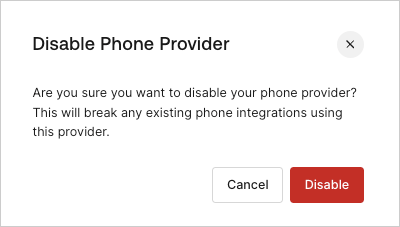
電話プロバイダーを無効にする
Unified Phone Experience を設定した後で無効にすると、MFA を含む電話プロバイダーとの既存の連携が利用できなくなる可能性があります。