> ## Documentation Index
> Fetch the complete documentation index at: https://docs-staging-feat-init-gt-translations.mintlify.site/llms.txt
> Use this file to discover all available pages before exploring further.

> 外部 API やサービスへの HTTP リクエストを認可するための、HTTP Vault 接続の設定方法を学びます。

# HTTP Vault 接続

<h2 id="configure-your-http-vault-connection-options">
  HTTP Vault 接続オプションを設定する
</h2>

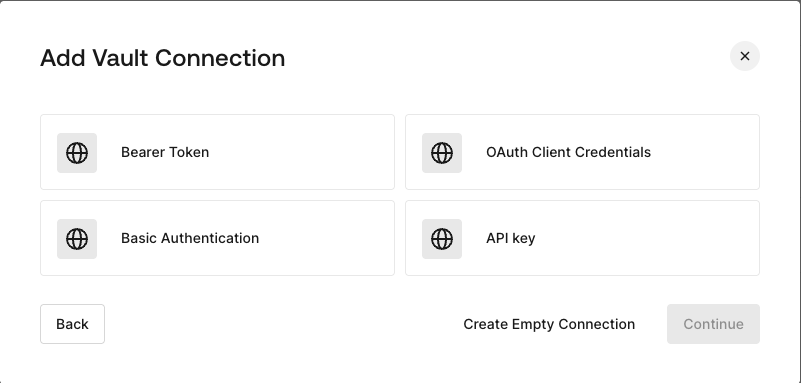
HTTP Vault 接続ではさまざまな認証オプションを設定でき、HTTP Request フローの Actions で利用できます。
<Frame>
  <img src="https://mintcdn.com/docs-staging-feat-init-gt-translations/K9-6G1zim4z3mt9R/docs/images/customize/forms/vaults/http-vault-connection-options.png?fit=max&auto=format&n=K9-6G1zim4z3mt9R&q=85&s=2c6c1743f41f3decc71964f0f7d0b881" alt="Auth0 Dashboard > Actions > フォーム > Vault > HTTP" data-og-width="801" width="801" data-og-height="383" height="383" data-path="docs/images/customize/forms/vaults/http-vault-connection-options.png" data-optimize="true" data-opv="3" srcset="https://mintcdn.com/docs-staging-feat-init-gt-translations/K9-6G1zim4z3mt9R/docs/images/customize/forms/vaults/http-vault-connection-options.png?w=280&fit=max&auto=format&n=K9-6G1zim4z3mt9R&q=85&s=3bd0a85818f66315485d1e8dca65649c 280w, https://mintcdn.com/docs-staging-feat-init-gt-translations/K9-6G1zim4z3mt9R/docs/images/customize/forms/vaults/http-vault-connection-options.png?w=560&fit=max&auto=format&n=K9-6G1zim4z3mt9R&q=85&s=a074767733d77d42401905da7e088e94 560w, https://mintcdn.com/docs-staging-feat-init-gt-translations/K9-6G1zim4z3mt9R/docs/images/customize/forms/vaults/http-vault-connection-options.png?w=840&fit=max&auto=format&n=K9-6G1zim4z3mt9R&q=85&s=6d071de943c4e13ac76c68811e14886b 840w, https://mintcdn.com/docs-staging-feat-init-gt-translations/K9-6G1zim4z3mt9R/docs/images/customize/forms/vaults/http-vault-connection-options.png?w=1100&fit=max&auto=format&n=K9-6G1zim4z3mt9R&q=85&s=baade64067afa6040d63562563cd0197 1100w, https://mintcdn.com/docs-staging-feat-init-gt-translations/K9-6G1zim4z3mt9R/docs/images/customize/forms/vaults/http-vault-connection-options.png?w=1650&fit=max&auto=format&n=K9-6G1zim4z3mt9R&q=85&s=91beb55c7ebcf1948390f277e2c4d52a 1650w, https://mintcdn.com/docs-staging-feat-init-gt-translations/K9-6G1zim4z3mt9R/docs/images/customize/forms/vaults/http-vault-connection-options.png?w=2500&fit=max&auto=format&n=K9-6G1zim4z3mt9R&q=85&s=61d28d0ba2337ab36fad3fafe8720bd6 2500w" />
</Frame>

<h2 id="configure-your-http-vault-connection-for-bearer-token">
  Bearer Token 用の HTTP Vault 接続を設定する
</h2>

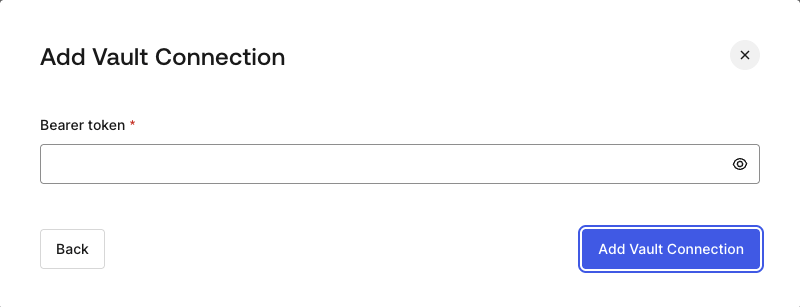
**Bearer Token** 認証を使用する HTTP Vault 接続を設定するには、必要なパラメーターを設定します。
<Frame>
  <img src="https://mintcdn.com/docs-staging-feat-init-gt-translations/K9-6G1zim4z3mt9R/docs/images/customize/forms/vaults/http-vault-connection-bearer-token.png?fit=max&auto=format&n=K9-6G1zim4z3mt9R&q=85&s=87cf51f766ac062e7a61ad9d26efd4d8" alt="Auth0 Dashboard > Actions > フォーム > Vault > HTTP" data-og-width="800" width="800" data-og-height="307" height="307" data-path="docs/images/customize/forms/vaults/http-vault-connection-bearer-token.png" data-optimize="true" data-opv="3" srcset="https://mintcdn.com/docs-staging-feat-init-gt-translations/K9-6G1zim4z3mt9R/docs/images/customize/forms/vaults/http-vault-connection-bearer-token.png?w=280&fit=max&auto=format&n=K9-6G1zim4z3mt9R&q=85&s=56e90696a8c9678834cf388f6e77352c 280w, https://mintcdn.com/docs-staging-feat-init-gt-translations/K9-6G1zim4z3mt9R/docs/images/customize/forms/vaults/http-vault-connection-bearer-token.png?w=560&fit=max&auto=format&n=K9-6G1zim4z3mt9R&q=85&s=384c2faae484be9e591ecc2dae64d063 560w, https://mintcdn.com/docs-staging-feat-init-gt-translations/K9-6G1zim4z3mt9R/docs/images/customize/forms/vaults/http-vault-connection-bearer-token.png?w=840&fit=max&auto=format&n=K9-6G1zim4z3mt9R&q=85&s=d474a4b844f40458f851a127c2f4fdf9 840w, https://mintcdn.com/docs-staging-feat-init-gt-translations/K9-6G1zim4z3mt9R/docs/images/customize/forms/vaults/http-vault-connection-bearer-token.png?w=1100&fit=max&auto=format&n=K9-6G1zim4z3mt9R&q=85&s=4e89cb709aced8aceb9ce70ee5581cdc 1100w, https://mintcdn.com/docs-staging-feat-init-gt-translations/K9-6G1zim4z3mt9R/docs/images/customize/forms/vaults/http-vault-connection-bearer-token.png?w=1650&fit=max&auto=format&n=K9-6G1zim4z3mt9R&q=85&s=7700f854dd5b3bfc0499257ddb92b162 1650w, https://mintcdn.com/docs-staging-feat-init-gt-translations/K9-6G1zim4z3mt9R/docs/images/customize/forms/vaults/http-vault-connection-bearer-token.png?w=2500&fit=max&auto=format&n=K9-6G1zim4z3mt9R&q=85&s=d5e6740bd9b6057be263be937b518954 2500w" />
</Frame>

<h3 id="input-settings">
  入力設定
</h3>

| 項目           | 説明                    |
| ------------ | --------------------- |
| Bearer Token | 外部サービスの認可に使用する固定トークン。 |

<h2 id="configure-your-http-vault-connection-for-oauth-client-credentials">
  OAuth Client Credentials 向けに HTTP Vault 接続を設定する
</h2>

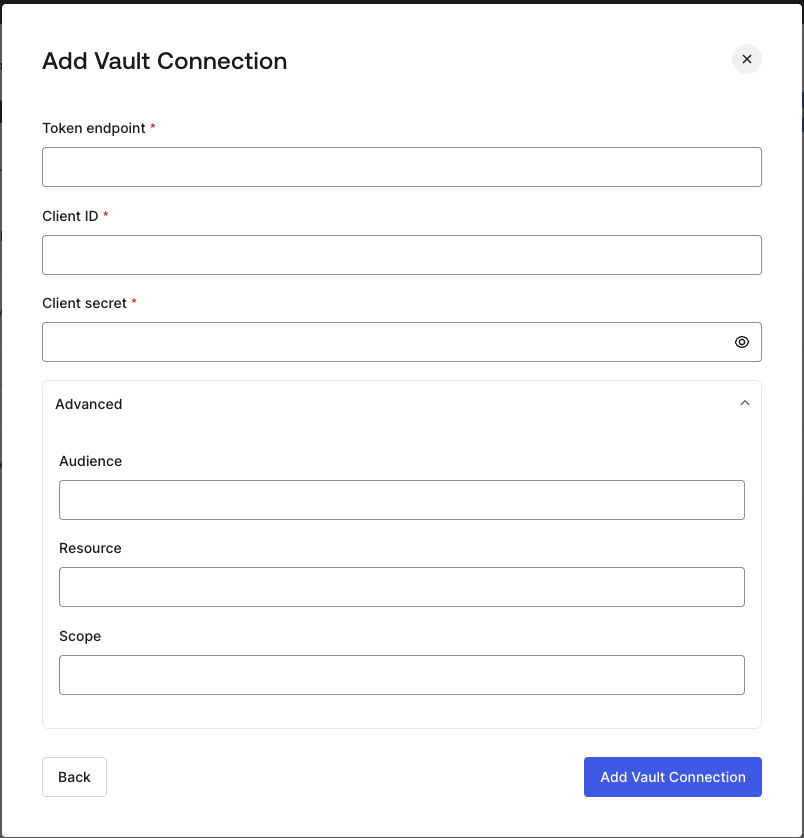
**Client Credentials** 認証を使用して HTTP Vault 接続を設定するには、必要なパラメーターを指定します。
<Frame>
  <img src="https://mintcdn.com/docs-staging-feat-init-gt-translations/K9-6G1zim4z3mt9R/docs/images/customize/forms/vaults/http-vault-connection-oauth-client-credentials.png?fit=max&auto=format&n=K9-6G1zim4z3mt9R&q=85&s=b012e49a9525a7684f112ac684afa157" alt="Auth0 Dashboard > Actions > フォーム > Vault > HTTP " data-og-width="804" width="804" data-og-height="838" height="838" data-path="docs/images/customize/forms/vaults/http-vault-connection-oauth-client-credentials.png" data-optimize="true" data-opv="3" srcset="https://mintcdn.com/docs-staging-feat-init-gt-translations/K9-6G1zim4z3mt9R/docs/images/customize/forms/vaults/http-vault-connection-oauth-client-credentials.png?w=280&fit=max&auto=format&n=K9-6G1zim4z3mt9R&q=85&s=aa35cae091cb4c3c42796dca49d60623 280w, https://mintcdn.com/docs-staging-feat-init-gt-translations/K9-6G1zim4z3mt9R/docs/images/customize/forms/vaults/http-vault-connection-oauth-client-credentials.png?w=560&fit=max&auto=format&n=K9-6G1zim4z3mt9R&q=85&s=a905032d9cd501c0b521ae05c3a1fda4 560w, https://mintcdn.com/docs-staging-feat-init-gt-translations/K9-6G1zim4z3mt9R/docs/images/customize/forms/vaults/http-vault-connection-oauth-client-credentials.png?w=840&fit=max&auto=format&n=K9-6G1zim4z3mt9R&q=85&s=e4373725f8b03cd079d6bb980ce42204 840w, https://mintcdn.com/docs-staging-feat-init-gt-translations/K9-6G1zim4z3mt9R/docs/images/customize/forms/vaults/http-vault-connection-oauth-client-credentials.png?w=1100&fit=max&auto=format&n=K9-6G1zim4z3mt9R&q=85&s=453471755f3bae8f8c43a7ec2a18fac6 1100w, https://mintcdn.com/docs-staging-feat-init-gt-translations/K9-6G1zim4z3mt9R/docs/images/customize/forms/vaults/http-vault-connection-oauth-client-credentials.png?w=1650&fit=max&auto=format&n=K9-6G1zim4z3mt9R&q=85&s=b1622f8035cf43022a7f4bef452398f0 1650w, https://mintcdn.com/docs-staging-feat-init-gt-translations/K9-6G1zim4z3mt9R/docs/images/customize/forms/vaults/http-vault-connection-oauth-client-credentials.png?w=2500&fit=max&auto=format&n=K9-6G1zim4z3mt9R&q=85&s=35b160a7ae8d89338f3e39529b49fdbd 2500w" />
</Frame>

<h3 id="input-settings-2">
  入力設定
</h3>

| Parameter           | Description                                         |
| ------------------- | --------------------------------------------------- |
| Tenant Endpoint     | アクセストークンを発行する認可サーバーの Tenant Endpoint。               |
| Client ID           | カスタム API へのアクセスを認可された M2M アプリケーションの Client ID。      |
| Client Secret       | カスタム API へのアクセスを認可された M2M アプリケーションの Client Secret。  |
| Audience (Optional) | カスタム API の audience。通常は Auth0 で定義したカスタム API で使用します。 |
| Resource (Optional) | カスタム API の Resource。audience とほぼ同じ意味を持つ標準パラメーターです。  |
| Scope (Optional)    | スペース区切りの文字列形式で指定するスコープのリスト。                         |

<h2 id="configure-your-http-vault-connection-for-api-key">
  API Key 用の HTTP Vault 接続を設定する
</h2>

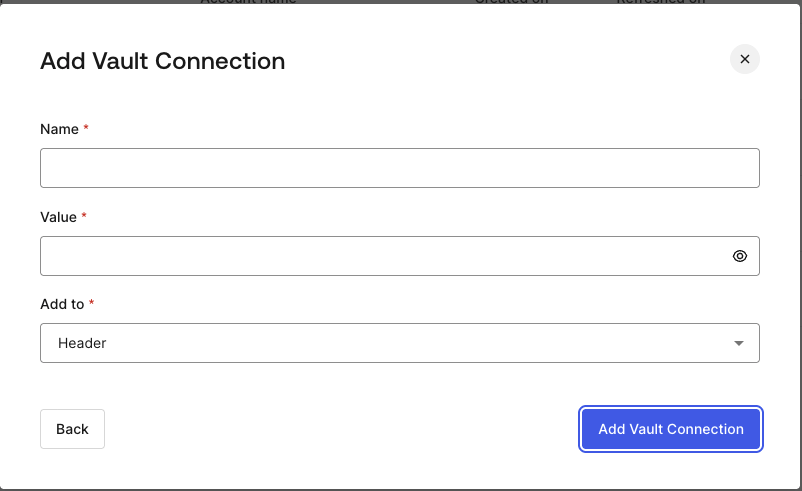
**API Key** 認証を使用して HTTP Vault 接続を設定するには、必要なパラメーターを指定します。
<Frame>
  <img src="https://mintcdn.com/docs-staging-feat-init-gt-translations/K9-6G1zim4z3mt9R/docs/images/customize/forms/vaults/http-vault-connection-api-key.png?fit=max&auto=format&n=K9-6G1zim4z3mt9R&q=85&s=cc48233f913553d1bb3ad0897093313c" alt="Auth0 Dashboard > Actions > フォーム > Vault > HTTP " data-og-width="802" width="802" data-og-height="491" height="491" data-path="docs/images/customize/forms/vaults/http-vault-connection-api-key.png" data-optimize="true" data-opv="3" srcset="https://mintcdn.com/docs-staging-feat-init-gt-translations/K9-6G1zim4z3mt9R/docs/images/customize/forms/vaults/http-vault-connection-api-key.png?w=280&fit=max&auto=format&n=K9-6G1zim4z3mt9R&q=85&s=3355eaee7c92f3ec289dcbfe0dfd572f 280w, https://mintcdn.com/docs-staging-feat-init-gt-translations/K9-6G1zim4z3mt9R/docs/images/customize/forms/vaults/http-vault-connection-api-key.png?w=560&fit=max&auto=format&n=K9-6G1zim4z3mt9R&q=85&s=aacb55dfc509aa5ef58c6d3bfa79c059 560w, https://mintcdn.com/docs-staging-feat-init-gt-translations/K9-6G1zim4z3mt9R/docs/images/customize/forms/vaults/http-vault-connection-api-key.png?w=840&fit=max&auto=format&n=K9-6G1zim4z3mt9R&q=85&s=c2ec625ddd28e368cd6a81cd8c3c52f9 840w, https://mintcdn.com/docs-staging-feat-init-gt-translations/K9-6G1zim4z3mt9R/docs/images/customize/forms/vaults/http-vault-connection-api-key.png?w=1100&fit=max&auto=format&n=K9-6G1zim4z3mt9R&q=85&s=5c8c6573e6aa4b79d835cc1c2d1fbe69 1100w, https://mintcdn.com/docs-staging-feat-init-gt-translations/K9-6G1zim4z3mt9R/docs/images/customize/forms/vaults/http-vault-connection-api-key.png?w=1650&fit=max&auto=format&n=K9-6G1zim4z3mt9R&q=85&s=d8dba3bdc06c7c3f934b1f12154c5fcf 1650w, https://mintcdn.com/docs-staging-feat-init-gt-translations/K9-6G1zim4z3mt9R/docs/images/customize/forms/vaults/http-vault-connection-api-key.png?w=2500&fit=max&auto=format&n=K9-6G1zim4z3mt9R&q=85&s=a95fc854a71e998b37c5db2a12dc01d4 2500w" />
</Frame>

<h3 id="input-settings-3">
  入力設定
</h3>

| Parameter | Description                                                              |
| --------- | ------------------------------------------------------------------------ |
| Name      | Header またはクエリパラメータとして追加する API Key の名前。                                   |
| Value     | Header またはクエリパラメータとして追加する API Key の値。                                    |
| Add To    | デフォルトでは Header に追加されます。API Key を Header として追加するか、クエリパラメータとして追加するかを指定します。 |

<h2 id="configure-your-http-vault-connection-for-basic-authentication">
  Basic Authentication の HTTP Vault 接続を設定する
</h2>

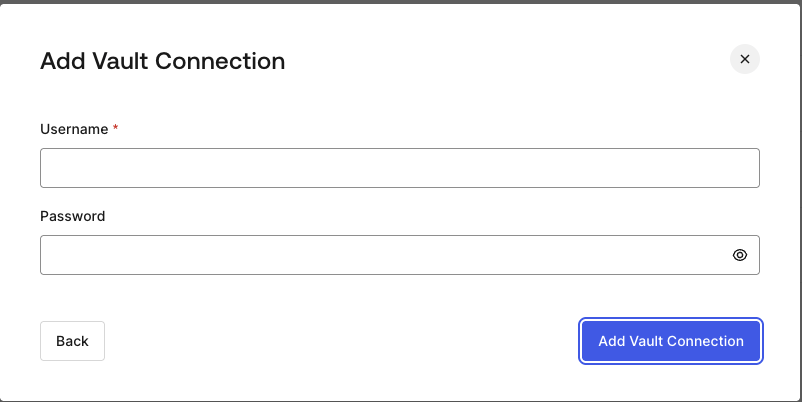
**Basic Auth** 認証を使用する HTTP Vault 接続を設定するには、必要なパラメーターを設定します。
<Frame>
  <img src="https://mintcdn.com/docs-staging-feat-init-gt-translations/K9-6G1zim4z3mt9R/docs/images/customize/forms/vaults/http-vault-connection-basic-authentication.png?fit=max&auto=format&n=K9-6G1zim4z3mt9R&q=85&s=976baef228b2c4b1364aaa8407947823" alt="Auth0 Dashboard > Actions > フォーム > Vault > HTTP " data-og-width="802" width="802" data-og-height="402" height="402" data-path="docs/images/customize/forms/vaults/http-vault-connection-basic-authentication.png" data-optimize="true" data-opv="3" srcset="https://mintcdn.com/docs-staging-feat-init-gt-translations/K9-6G1zim4z3mt9R/docs/images/customize/forms/vaults/http-vault-connection-basic-authentication.png?w=280&fit=max&auto=format&n=K9-6G1zim4z3mt9R&q=85&s=0fc24a20bfe77894b2e3155ad4a8b3ae 280w, https://mintcdn.com/docs-staging-feat-init-gt-translations/K9-6G1zim4z3mt9R/docs/images/customize/forms/vaults/http-vault-connection-basic-authentication.png?w=560&fit=max&auto=format&n=K9-6G1zim4z3mt9R&q=85&s=64392d72fd756a9162e0fd3c4011b0b6 560w, https://mintcdn.com/docs-staging-feat-init-gt-translations/K9-6G1zim4z3mt9R/docs/images/customize/forms/vaults/http-vault-connection-basic-authentication.png?w=840&fit=max&auto=format&n=K9-6G1zim4z3mt9R&q=85&s=d9843575b380b7d5ad7e957bfb2aa30a 840w, https://mintcdn.com/docs-staging-feat-init-gt-translations/K9-6G1zim4z3mt9R/docs/images/customize/forms/vaults/http-vault-connection-basic-authentication.png?w=1100&fit=max&auto=format&n=K9-6G1zim4z3mt9R&q=85&s=984ee365b05e94f2db4e58bd7c6980e4 1100w, https://mintcdn.com/docs-staging-feat-init-gt-translations/K9-6G1zim4z3mt9R/docs/images/customize/forms/vaults/http-vault-connection-basic-authentication.png?w=1650&fit=max&auto=format&n=K9-6G1zim4z3mt9R&q=85&s=8133dfc061aa2e6aa2e42382ae88af5e 1650w, https://mintcdn.com/docs-staging-feat-init-gt-translations/K9-6G1zim4z3mt9R/docs/images/customize/forms/vaults/http-vault-connection-basic-authentication.png?w=2500&fit=max&auto=format&n=K9-6G1zim4z3mt9R&q=85&s=f2f9d2ddb976d79b21c37078334f2061 2500w" />
</Frame>

<h3 id="input-settings-4">
  入力設定
</h3>

| Parameter | Description                                                  |
| --------- | ------------------------------------------------------------ |
| ユーザー名     | 連結してBase64エンコードし、Basic Authorization ヘッダーパラメーターとして追加するユーザー名。 |
| パスワード     | 連結してBase64エンコードし、Basic Authorization ヘッダーパラメーターとして追加するパスワード。 |

<Warning>
  Basic Auth が設定された HTTP Vault 接続は、現在 Flows HTTP Request Action に組み込まれているオプションを将来的に置き換える予定です。
</Warning>
